styled-component props error 해결
지원한 회사의 사전 과제를 하던 중.. 어떠한 에러도 만들지 않겠다고 다짐하는 순간 나타난 Error.....
어떤 오류 였을까?
일단 기능에는 문제 없는 에러였지만 고치면 개발자도구가 깔끔해질 것 같은 느낌이라 고쳤습니다.. 저와 같이 답답한 사람은 절 보고 고치시길..!
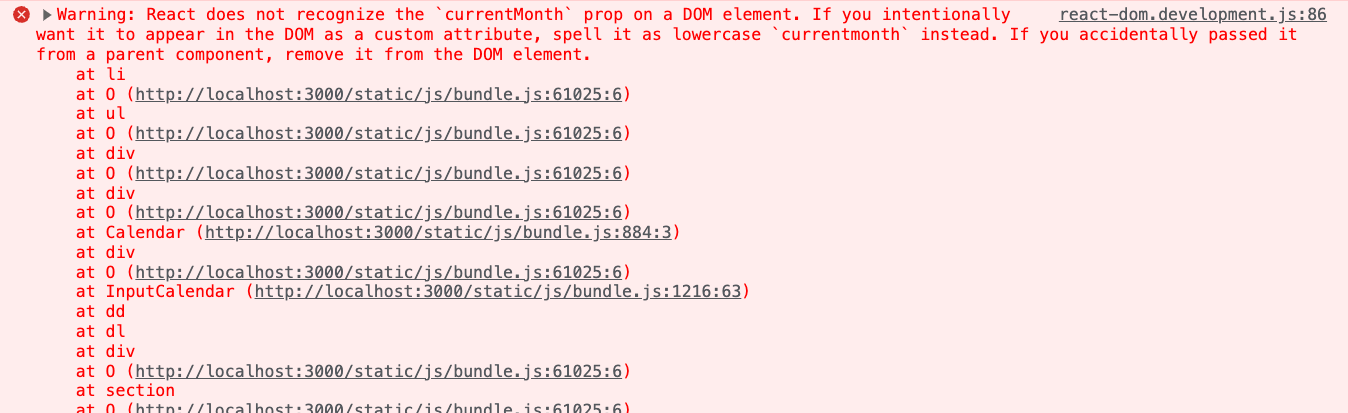
Warning: React does not recognize the
currentMonthprop on a DOM element. If you intentionally want it to appear in the DOM as a custom attribute, spell it as lowercasecurrentmonthinstead. If you accidentally passed it from a parent component, remove it from the DOM element.
뭐 이러쿵저러쿵.. lowercase를 자꾸 쓰라는 것 같다..
문제의 코드를 봐보자.
<CalendarDate
  key={index}
  className={item.currentMonth && selectedDate === item.date ? 'select-date' : ''}
  today={item.date === today.date}
  currentMonth={item.dateOfMonth === selectedMonth}
  onClick={(e) => onClickDate(e, item.dateOfMonth!)}
>
   {item.date && item.date.toString()}
</CalendarDate>
style code
const CalendarDate = styled.li<DatesProps>`
  color: ${({ currentMonth }) => (currentMonth ? '#333' : '#bebebe')};
  font-size: 14px;
  font-weight: ${({ today }) => (today ? 'bold' : 'regular')};
  width: 32px;
  height: 32px;
  display: flex;
  align-items: center;
  justify-content: center;
  border-radius: 16px;
  cursor: pointer;

  &.select-date {
    background-color: #024eee;
    color: #fff;
  }

  &:hover {
    background-color: #dbe1fd;
  }

  &:active {
    background-color: #024eee;
    color: #fff;
  }
`;
이렇게 보면, currentMonth 값을 판별해, color를 지정해주는 것인데
currentMonth 의 M이 uppercase여서 저러는 것 같다.. 그래서 혹시나하고
current로 바꿨더니, 오류가 없어졌습니다.
네 왜 이런 이유가 발생할까요.. 아직 알다가도 모르는 React 였습니다.
하지만 이렇게 하면, props가 어떤 값을 전달하는지 잘 알 수가 없어서 그냥
currentmonth라고 lowercase로 작성해보았습니다.
잘됩니다.
결론
styled-components 를 쓸 때 props를 활용해서 style 를 변경할 때는 가급적 lowercase를 사용하는 것을 추천한다! (이유는 과제 끝나고 공부할게유)