namespace
- 함수, 클래스 등등의 이름 충돌을 피하기 위해 사용한다.
- namespace는 소문자로 쓰자.
- 예전 C에서 아래와 같이 심볼이름이 같으면 컴파일 에러
void SayHello();
void SayHello();
#include "Hello1.h"
#include "Hello2.h"
SayHello();
- namespace 사용
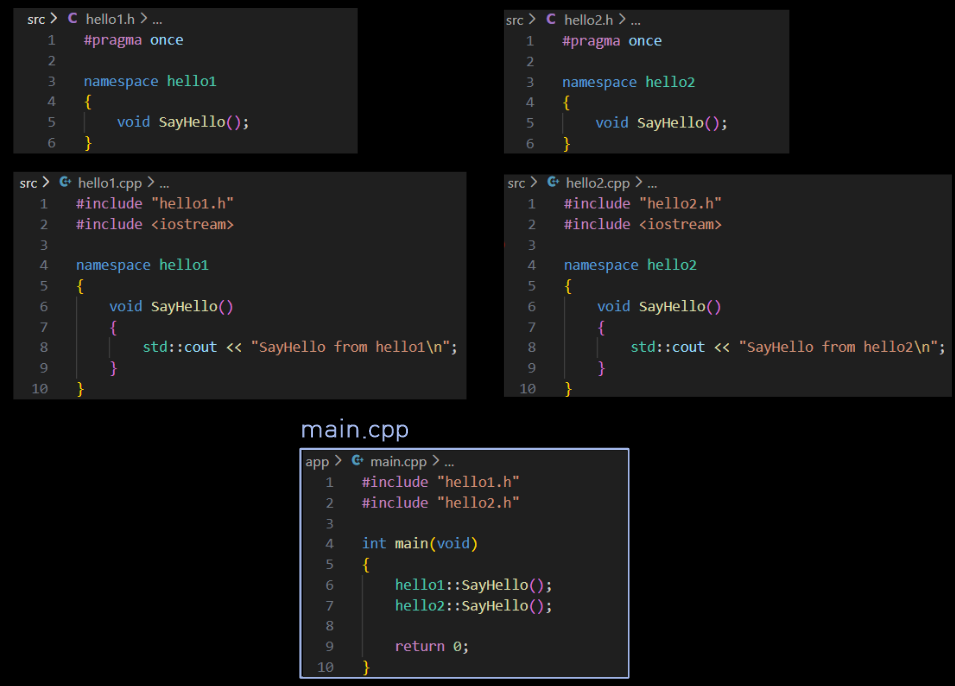

똑같은 이름의 심볼 SayHello()를 사용할 수 있다.
cout
showbase/noshowbase
dec/hex/oct
std::showbase: 진수 base표기 하라std::noshowbase: 진수 base표기 Xstd::dec: 10진수 출력하라std::hex: 16진수 출력하라std::oct: 8진수 출력하라
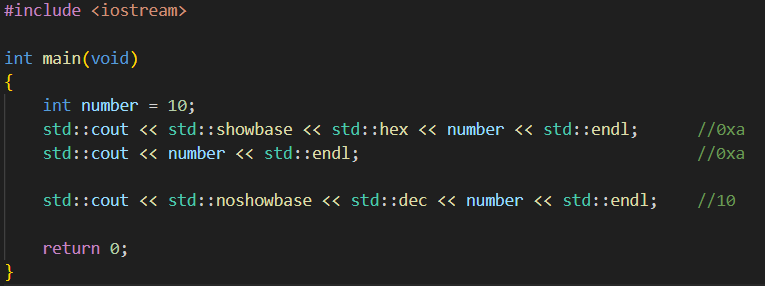 한번 manipulator를 조정하면, 플래그가 스트림에 남기 때문에 다시 원복 시켜야함
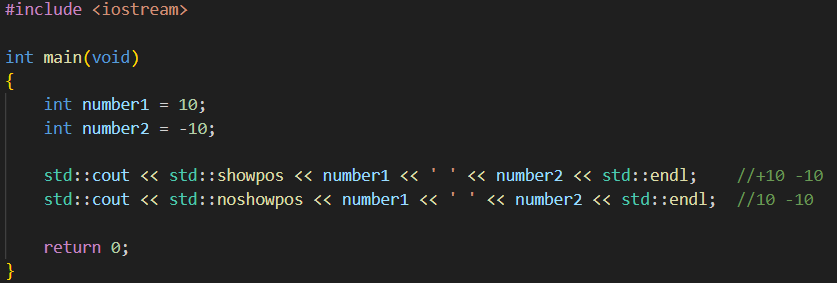
showpos/noshowpos
std::showpos: 양수 일때, 부호(+) 표시 출력std::noshowpos: 양수 일때, 부호(+) 표시 미출력
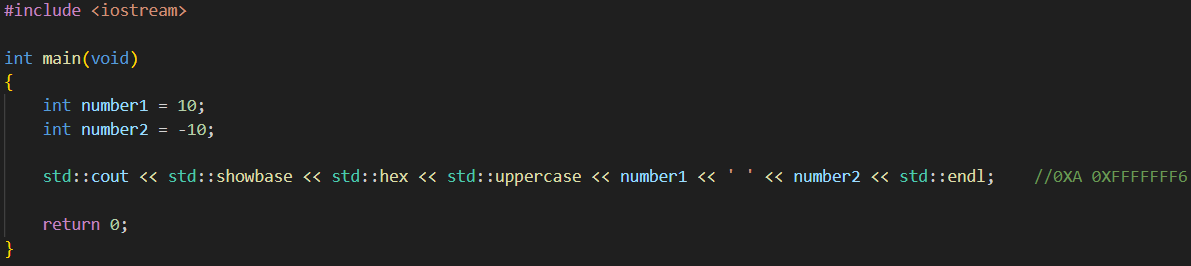
uppercase/nouppercase
std::uppercase: 대문자로 출력
setw
#include <iomanip>std::setw()
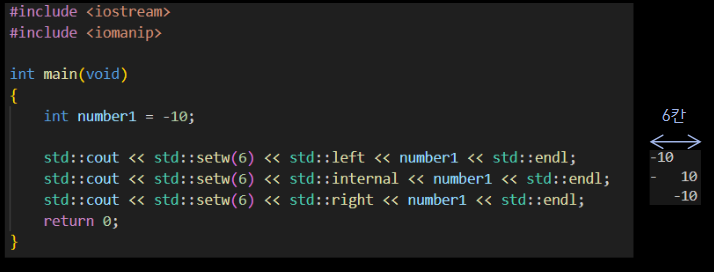
setfill
#include <iomanip>std::setfill()
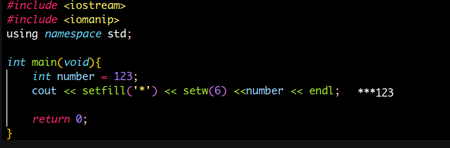
fixed/defaultfloat/scientific
std::fixed: 부동 소수점 수를 일반 십진수 형식으로 출력 + setprecision의 의미를 소수 점 이하 자리수로 변경한다.std::defaultfloat: 기본 모드std::scientific: 과학표기(1.23e+06) 으로 표기
#include <iostream>
int main() {
double x = 1234567.89;
std::cout << x << '\n';
std::cout << std::fixed << x << '\n';
std::cout << std::scientific << x << '\n';
x = 0.00012345;
std::cout << std::defaultfloat << x << '\n';
std::cout << std::fixed << x << '\n';
std::cout << std::scientific << x << '\n';
return 0;
}
setprecision
#include <iomanip>std::fixed없이 사용 시: 유효 숫자 지정std::fixed와 사용 시: 소수점 자리수 지정
#include <iostream>
#include <iomanip>
int main() {
double x = 1234567.89;
std::cout << std::setprecision(2) << x << '\n';
std::cout << std::fixed << x << '\n';
std::cout << std::scientific << x << '\n';
x = 0.00012345;
std::cout << std::defaultfloat << x << '\n';
std::cout << std::fixed << x << '\n';
std::cout << std::scientific << x << '\n';
return 0;
}
showpoint/noshowpoint
std::showpoint: 소수점 항상 표시std::noshowpoint: 소수점 항상 표시 안해도 됨.
#include <iostream>
int main() {
double x1 = 100.0;
double x2 = 100.12;
std::cout << std::showpoint << x1 << ' ' << x2 << '\n';
std::cout << std::noshowpoint << x1 << ' ' << x2 << '\n';
return 0;
}
boolalpha
std::boolalpha: boold값을 0,1 대신 문자열(true,false)로 출력
#include <iostream>
int main() {
bool flag = true;
std::cout << flag << '\n';
std::cout << false << '\n';
std::cout << std::boolalpha << flag << '\n';
std::cout << false << '\n';
}
setf(), unsetf()
- 위 매니퓰레이트를
setf(), unsetf() 플래그로 또 조정할 수 있으나 잘 사용되진 않음
cin
cin을 char 배열에 넣고 싶다면.. 문제가 있다.
#include <iostream>
#include <iomanip>

int main() {
    char name[4];
    std::cin >> std::setw(4) >> name;

    std::cout << name;
    return 0;
}


----
HELLO(엔터)

0 1 2 3
H E L \0
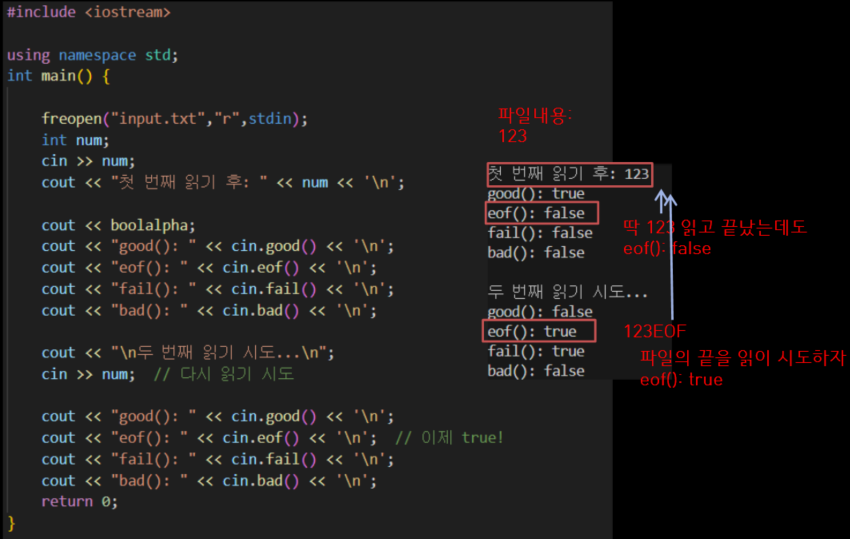
스트림 상태(Stream Status)
istream상태
- istream 상태
- 클래스:
ios_base
- 비트 플래그
cin.gootbit: 모든 것이 정상일 때의 상태.cin.eofbit: EOF를 넘어서 읽으려 할때!cin.failbit: 입출력 작업이 실패
- 정수 읽으려는데 문자 입력됨
- 타입 불일치
- 파일 열 수 없음
cin.badbit: 심각한 오류 비트
- 메모리 할당 실패
- 디스크 오류
- 스트림 손상
- badbit가 설정되면 보통 복구 불가
- 메소드 버전
cin.good(): 모든 비트가 0일때 true 반환, 즉, gootbit 상태일 때만 truecin.eof(): eofbit가 설정 되어 있으면 truecin.fail(): failbit또는 badbit가 설정되어 있다면 truecin.bad(): badbit만 확인
#include <iostream>
int main() {
std::cout << std::boolalpha;
std::cout << std::cin.goodbit << '\n';
std::cout << std::cin.good() << '\n';
return 0;
}
cin.clear(): good state 돌리기
- 스트림을 좋은 상태(
good state)로 돌려준다.
cin.clear();
- 위 예제에서
cin.clear();를 사용해보자.
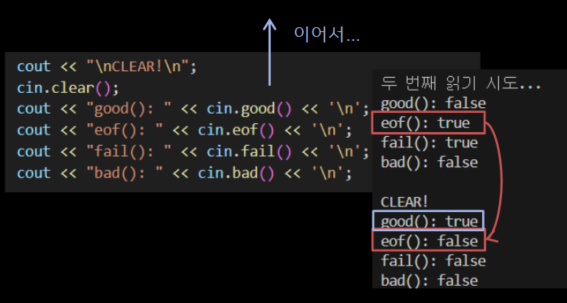
good(): trueeof(): false로 변경됨
cin.ignore(): 입력 스트림 문자 무시
cin.ignore(streamsize n = 1, int delim = EOF);
- n: 무시할 최대 문자 수(기본값: 1)
- delim: 구분자 문자(이 문자를 만나면 중단, 기본값:EOF)
- n개의 문자를 버퍼에서 제거하거나
- delim 문자를 만나면 중단 (delim도 함께 제거)
- 둘 중 먼저 조건을 만족하는 쪽에서 멈춤
#include <iostream>
using namespace std;
int main() {
int age;
string name;
cin >> age;
getline(cin,name);
cout << age;
cout << name;
return 0;
}
------
25(엔터) # 입력
25 # 출력
#include <iostream>
using namespace std;
int main() {
int age;
string name;
cin >> age;
cin.ignore();
getline(cin,name);
cout << age;
cout << name;
return 0;
}
----
25(엔터) # 입력
hello(엔터) # 입력
25hello # 출력
cin.ignore(LLONG_MAX, '\n');
- 최대 문자 수 버림. 단 그 전에 뉴라인 문자를 버리면 곧바로 멈춤
cin.get()
- 뉴라인(
\n) 문자를 만나기 전까지 모든 문자를 가져옴.
- 뉴라인(
\n) 문자는 입력 스트림에 남아 있음
char name[5];
std::cin.get(name,5);
- 4문자 +
'\0' = 5
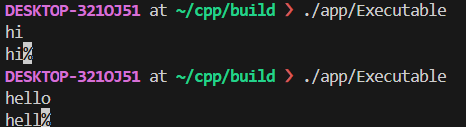
#include <iostream>

int main() {

    char name[5];
    std::cin.get(name, 5);

    char name2[5];
    std::cin.get(name2,5);

    std::cout << name << '\n';
    std::cout << name2 << '\n';
    return 0;
}
get(name, 100, '#');
- 뉴라인이 아닌
#가 나올때까지 or 99자 받음
cin.getline()
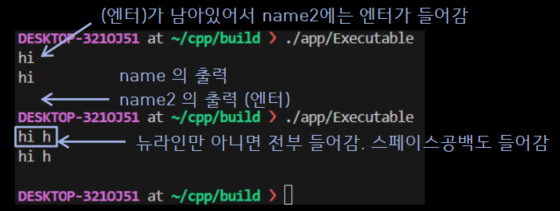
cin.get()과 유사하나 차이점은 뉴라인('\n')을 입력 스트림에서 버린다.- C style string에만 줄 수 잇음.
#include <iostream>

int main() {

    char name[5];
    std::cin.getline(name, 5);

    char name2[5];
    std::cin.getline(name2,5);

    std::cout << name << '\n';
    std::cout << name2 << '\n';
    return 0;
}
----
hi(엔터)	# 입력 -> name에 대한 입력
hi(엔터)	# 입력 -> name2에 대한 입력
hi 	# 출력 name에 대한 출력
hi	# 출력 name2에 대한 출력
std::string, string클래스
#include <string>std::string
#include <string>
std::string Name;
std::cin >> Name;
- 힙(heap) 메모리 할당 느림
- 메모리 단편화 문제
- 내부 버퍼의 증가는 멀티 스레드 환경에서 안전하지 않을 수도..
- 그래서 여전히,
springf()와 함께 char[]를 매우 많이 사용.
c_str()
const char* return- 해당 string이 가지고 있는 문자 배열의 시작 주소를 가리키는 포인터를 반환
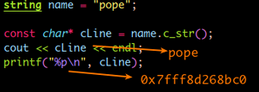
string을 타겟으로한 getline
std::getline(스트림, 타겟 string객체)
- C 스타일 char str[5]; 같은 곳은 못준다.
#include <iostream>
#include <string>

int main() {

    std::string name1, name2;
    std::getline(std::cin,name1);
    std::getline(std::cin,name2);

    std::cout << name1 << '\n';
    std::cout << name2 << '\n';
    return 0;
}
getline(cin,name)
cin에서 문자들을 꺼내 name에 저장'\n'를 만날때까지'\n'는 무시
getline(cin,name, '@')cin.getline과 다르게 몇자 지정은 없음
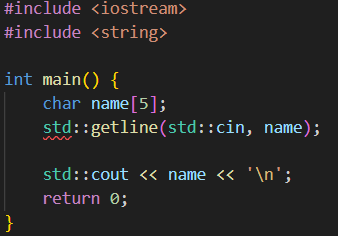 C style 문자열에게는 에러
sstream
istringstream
- C++ 문자열 스트림 클래스
- C의
sscanf() 비슷
#include <sstream>std::istringstream- 문자열을(not console) 입력 스트림처럼 다룰 수 있게 해줌
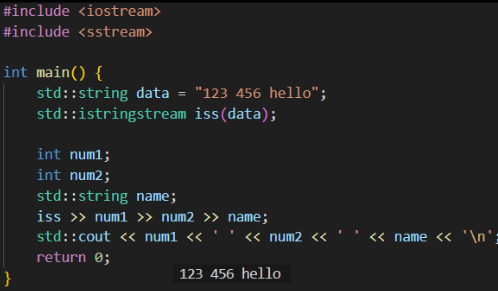
- istringstream 클래스 타입의, iss 객체를, data string의 내용으로 생성
- 마치, data 문자열을 담은 가상 파일을, iss로 읽을 준비를 하는 것.
마치 cin >> num1 >> .. 과 똑같이 동작한다고 보면 됨.
tokenizer
string s = "apple,banana,cherry";
istringstream iss(s);
string token;
vector<string> result;

while (getline(iss, token, ',')) {
    result.push_back(token);
}
ostringstream
- 데이터를 문자열로(not colsole) 쓰기(출력)
- C의
sprintf와 비슷
#include <sstream>std::ostringstream
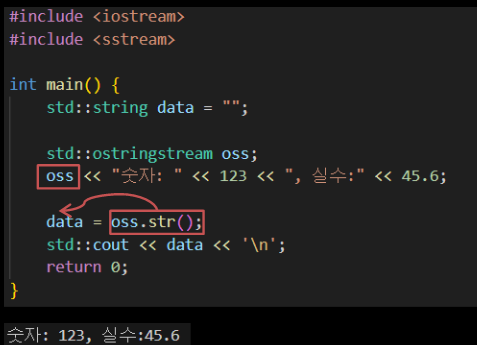
oss 객체에 cout 처럼 << 로 담아서,
oss.str()로 문자열로 반환
stringstream
istringstream이 입력 전용, ostringstream이 출력 전용이었다면,
stringstream은 입출력 모두 가능
fstream: 파일 입출력
#include 〈fstream〉std::ifstream 파일 입력용 스트림 클래스std::ofstream 파일 출력 스트림 클래스std::fstream 파일 입력 및 출력 스트림 클래스
| C | C++ | 설명 |
|---|
fp = fopen("hello.txt", "r"); | ifstream fin;
fin.open("hello.txt"); | 읽기 전용으로 파일을 오픈 |
fp = fopen("hello.txt", "w+"); | ofstream fout;
fout.open("hello.txt"); | 쓰기 전용으로 파일 오픈, 파일이 없으면 생성 |
fp = fopen(:hello.txt", "r+"); | fstream fs;
fs.open("hello.txt"); | 일기 쓰기 범용으로 파일 오픈 |
open()
- 각 스트림마다
open() 메서드가 있다.
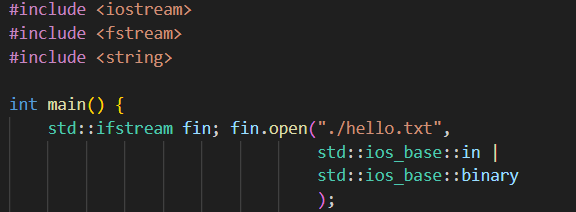
- 모드 플래그
- 네임스페이스: std::ios_base
- 모든 조합이 유효하지는 않다.
| 모드 플래그 | 설명 |
|---|
| in | 입력 |
| out | 출력 |
| ate | 제일 마지막에 파일포인터를 옮기기 |
| app | 덧붙이기 |
| trunc | 읽은 다음 속의 내용을 버리고 처음부터 시작 |
| binary | 2진 파일 |
| C | C++ |
|---|
"r" | ios_base::in |
"w" | ios_base::out
ios_base::out | ios_base::trunc |
"a" | ios_base::out | ios_base::app |
"r+" | ios_base::in | ios_base::out |
"w+" | ios_base::in | ios_base::trunc |
파일에서 문자 하나씩 읽기
#include <iostream>
#include <fstream>

int main() {
    std::ifstream fin;
    fin.open("hello.txt");

    char ch;
    while(true){
        fin.get(ch);
        if(fin.fail()){
            break;
        }
        std::cout << ch;
    }
    return 0;
}
파일에서 한줄씩 읽기
cin >> str처럼, fin >> str 가능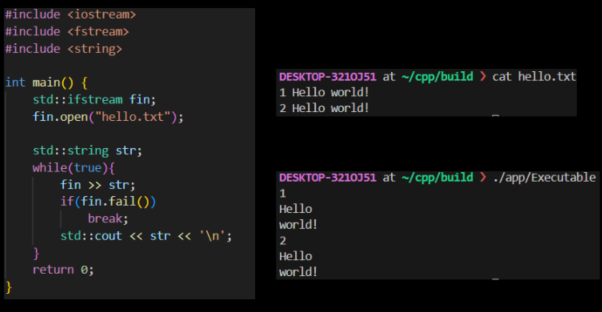
string의 std::getline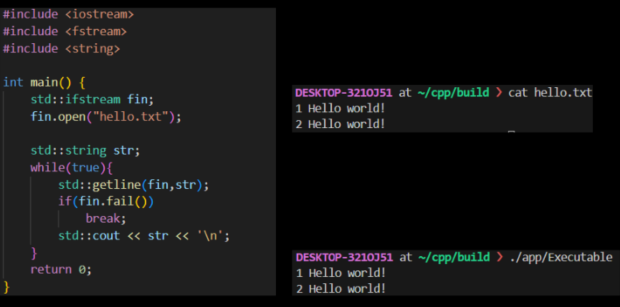
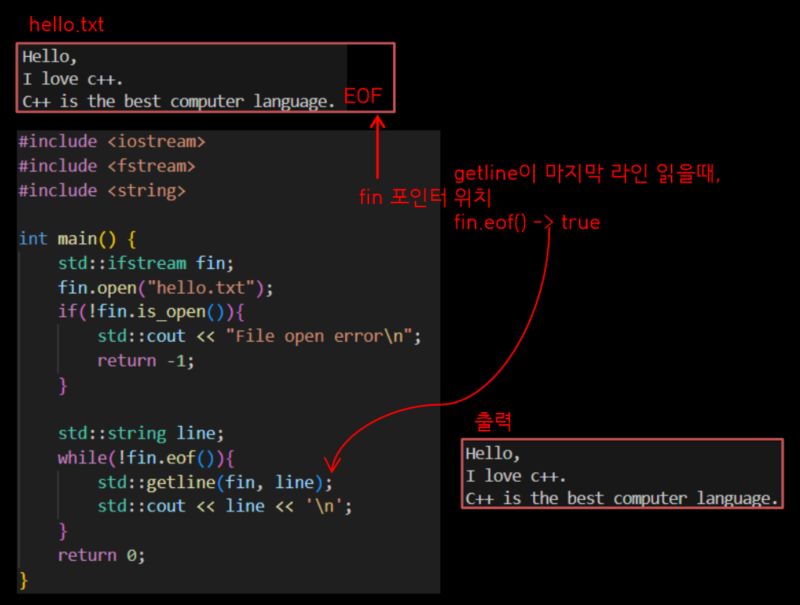
다양한케이스에서 살펴보기
- 입력 파일이 개행하지 않고
EOF일때, 아래 코드는 잘 출력됨
- 입력 파일이 개행하고 EOF일때,
- getline은
"" 빈 문자도 읽기 때문에 아래와 같이 출력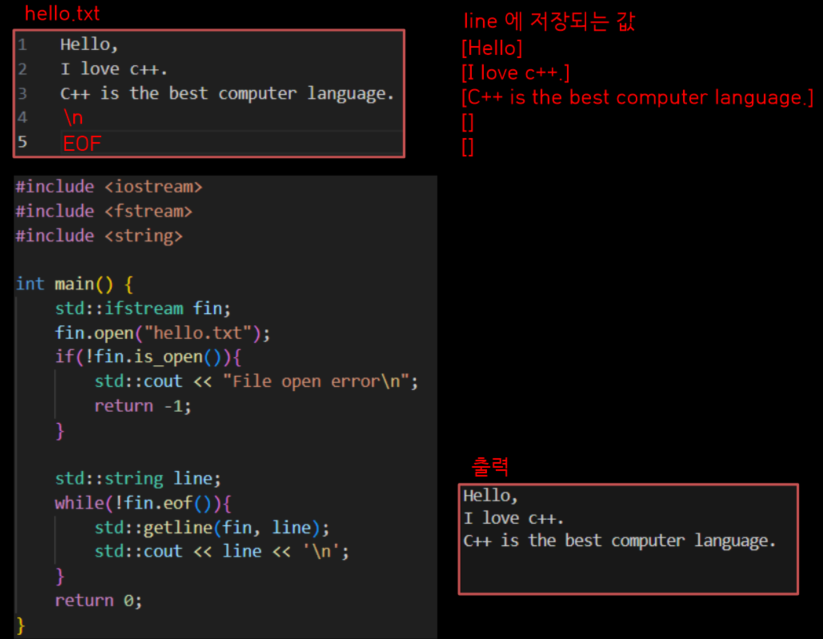
int형에 받으면, 그대로 하면 무한 루프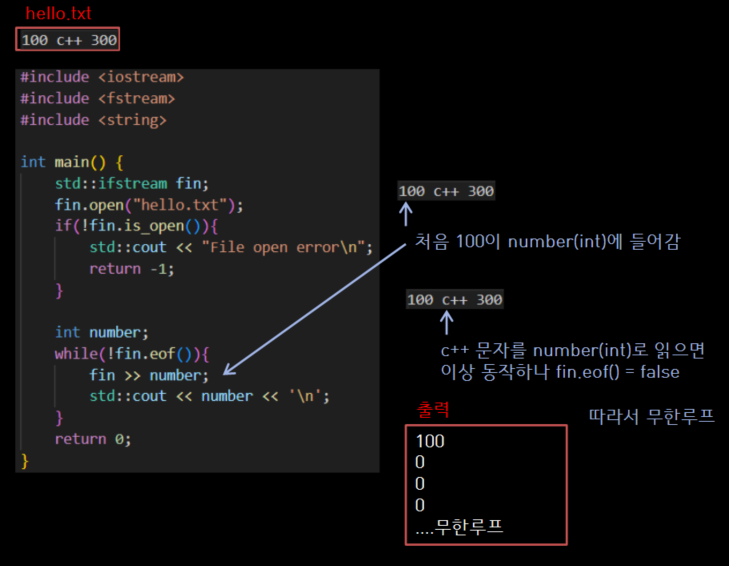
- 루프 사이에
fin.fail() 을 검사하게 만들자.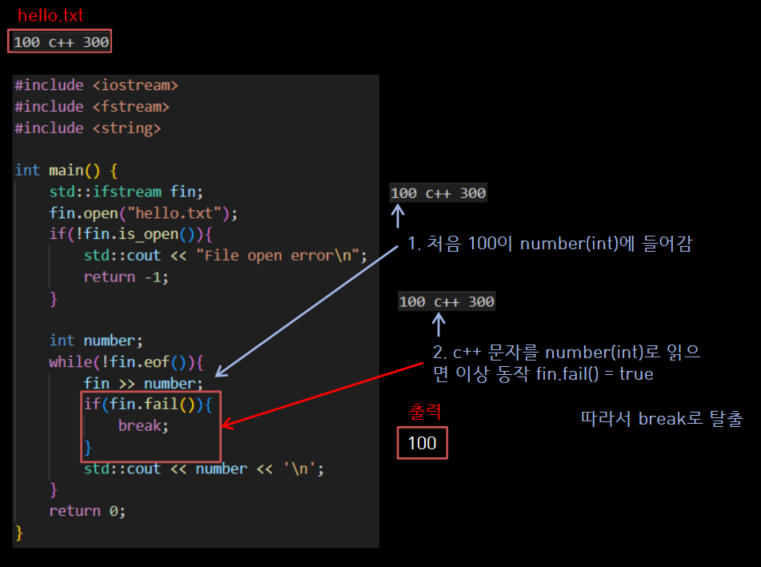
- 다음과 같이하면
c++은 건너뛸 수 있다.
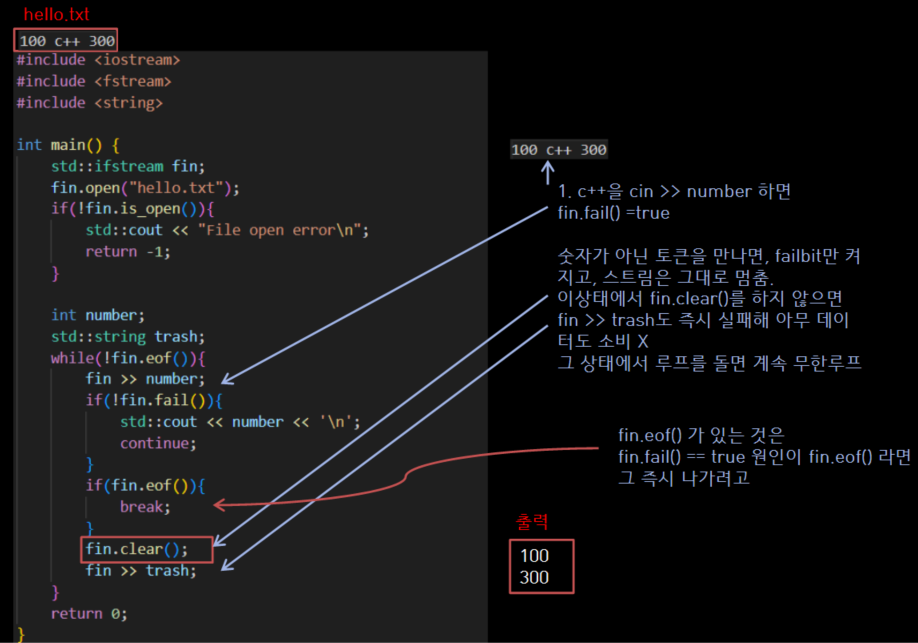
fin.clear()를 꼭 해줘야 fin >> trash가 성공하여 스트림 위치가 넘어감
파일에 쓰기
ofstream을 사용하여 파일 간단 쓰기 예
#include <iostream>
#include <fstream>
#include <string>

int main() {
    std::ofstream fout;
    fout.open("hello.txt");

    std::string line;
    std::getline(std::cin, line);
    if(!std::cin.fail()){
        fout << line << std::endl;
    }
    fout.close();
    return 0;
}
seek
fstream fs("helloWorld.dat", ios_base::in | ios_base::out | ios_base::binary);
if(fs.is_open())
{
fs.seekp(20, ios_base::beg);
if(!fs.fail())
{
}
}
fs.close();
p: put 즉, 쓰기용g: get 즉, 읽기용
| 탐색 방향 유형 | 설명 |
|---|
ios_base::beg | 시작부터 얼마나 |
ios_base::cur | 현재부터 얼마나 |
ios_base::end | 끝에서 부터 얼마나 |
tellp(), seekp()tellp(): 쓰기 포인터의 위치 구함
ios::pos_type pos = fout.tellp();
fout.seekp(0);
fout.seekp(20, ios_base::cur):
tellg(), seekg()tellg(): 읽기 포인터 위치 구함
ios::pos_type pos = fin.tellg();
fin.seekg(0);
fin.seekg(-10, ios_base::end);

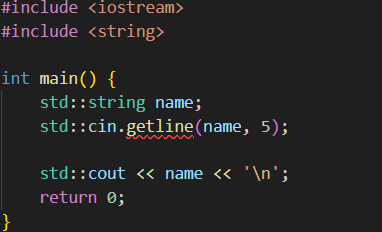 에러!
에러!