
왜 쓰는 것일까?
어떤 분야든 마찬가지겠지만 공부를 할 때, 배워서 어디에 써먹을 수 있는가?를 먼저 생각해보아야 한다.
문법만 배우고 실무에서 활용하는 방법을 모른다면 보람이 없다.
reduce()는 배열의 4칙연산 뿐만 아니라 배열 요소의깊은 필터링을 통해 원하는 정보들의 구성으로 이루어진배열을 반환할 수 있다.
map()이나filter()보다 좀 더 다양한 활용이 가능하다.
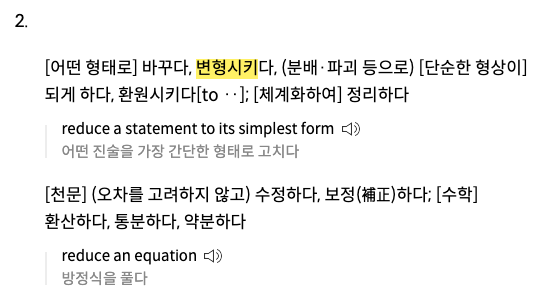
reduce는 막상 들으면 뭘 감소시킨다는 거지? 라고 생각이 드는데, 사전을 검색해 보니 흔히 쓰이는 뜻이 아닌
변형 시키다또는수정하다라는 뜻도 있었다.배열을 가지고 다양한 방법으로 편집 가능하게 해주는 reduce 메서드에게 잘 어울리는 이름이었다.
- 기존 배열을 변형시키지 않는다.
- 새로운 배열을 반환한다.
reduce()의 1번째 인자인 콜백함수는배열 요소 수만큼 반복하여 실행된다.- 반복시 return 값은 다시 콜백함수의 첫번째 인자로 들어온다.
reduce()의 2번째 인자는콜백함수의 첫번째 인자 초기값인데(권장) 넣지 않으면 배열의 1번째 요소부터 연산한다.
reduce()의 인자
- 1번째(콜백함수) 인자
- 1번째 인자 - 누산기 : 2번째 순회할 때부터 콜백 함수의 return 값이 들어온다. 처음에는 초기값이 있으면 초기값이 들어오고, 없다면 배열의 1번째 요소가 들어온다.
- 2번째 인자 - 배열 요소 : 초기값이 없다면 현재 배열의 2번째 요소부터 들어오고, 있다면 1번째 요소부터 들어온다.
- 세번째 인자 - index 값 : 초기값이 없다면 1부터, 있다면 0부터 시작
- 네번째 인자 - 기존 배열
- 두번째 인자 - 초기값 : 초기값을 넣으면 콜백 함수의 첫번째 인자로 초기값이 들어간다.
활용 예제
예제 1 - 배열 요소의 누적 총합을 구하고 싶을 때
const arr = [1, 2, 3, 4, 5];
// 배열 모든 요소 합계
const sum = arr.reduce((acc, cur, i) => {
  console.log('A :', acc, 'C :', cur, 'i :', i);
  return acc + cur;
});

// A : 1   C : 2  i : 1
// A : 3   C : 3  i : 2
// A : 6   C : 4  i : 3
// A : 10  C : 5  i : 4
sum; // 15

// 초기값 0을 넣어도 결과는 동일하다.
const arr = [1, 2, 3, 4, 5];
// 배열 모든 요소 합계
const sum = arr.reduce((acc, cur, i) => {
  console.log('A :', acc, 'C :', cur, 'i :', i);
  return acc + cur;
}, 0);

// A : 0   C : 1  i : 0
// A : 1   C : 2  i : 1
// A : 3   C : 3  i : 2
// A : 6   C : 4  i : 3
// A : 10  C : 5  i : 4
sum; // 15
예제 2 - 배열 속 객체의 특정 부분을 필터링하여 누적 합계 계산하고 싶을 때
// 중국을 제외한 모든 나라들의 pop 의 합계
const arr = [
  { country: 'China',pop: 9 },
  { country: 'India', pop: 6 },
  { country: 'USA', pop: 10 },
  { country: 'Indonesia', pop: 5 }
]
const reducer = (acc, cur) => {
  console.log('A :', acc, 'C.pop :', cur.pop);
  return cur.country === 'China' ? acc : acc + cur.pop;
}

// A : 0   C.pop : 9
// A : 0   C.pop : 6
// A : 6   C.pop : 10
// A : 16  C.pop : 5
arr.reduce(reducer, 0); // 21
콜백 함수의 로직은 아래와 동일하다.
const reducer = (acc, cur) => {
  console.log('A :', acc, 'C.pop :', cur.pop);
  if (cur.country === 'China') {
    return acc;
  } else {
  	return acc + cur.pop;
  }
}
예제 3 - 배열 요소들의 평균을 구하고 싶을 때
const arr = [10, 30, 20];

const average = arr.reduce( (total, cur, index, arr) => {
  console.log('T :', total, 'C :', cur, 'I :', index);
  total += cur;
  if ( index === arr.length - 1) { // 마지막 인덱스라면
    return total / arr.length; // 평균 계산
  } else {
    return total; // 누적값
  }
}, 0);
// T : 0   C : 10  I : 0
// T : 10  C : 30  I : 1
// T : 40  C : 20  I : 2
average; // 20
예제 4 - 배열 요소를 2배로 만들어 새로운 배열을 만들고 싶을 때
const arr = [4, 10, 30];
const doubled = arr.reduce( (total, cur) => {
  console.log('T :', total, 'C :', cur);
  total.push(cur * 2);
  return total;
}, []);

// T : []       C : 4
// T : [8]      C : 10
// T : [8, 20]  C : 30
doubled; // [8, 20, 60]
사실 이런 케이스는
map()을 쓰면 더 간단해진다.
const mapped = arr.map( el => el * 2 );
mapped; // [8, 20, 60]

// 5이상인 요소만 2배로 필터링 할 수도 있다.
const mapped = arr.map( el => el > 5 ? el * 2 : el );
mapped; // [4, 20, 60]
예제 4.5 - 배열 요소 중 원하는 수 이상만 필터링하고 변경해서 반환하고 싶을 때
const arr = [4, 10, 30];
const result = arr.reduce( (total, cur) => {
  console.log('T :', total, 'C :', cur);
  if (cur > 5) {
    total.push(cur * 2);
  }
  return total;
}, []);

// T : []    C : 4
// T : []    C : 10
// T : [20]  C : 30
result; // [20, 60]
이 경우는
filter()를 사용하고map()을 한번 더 사용해줘야 같은 결과값을 얻을 수 있다.
간단한 연산의 경우 아래와 같이 두번 체이닝해서 사용하는 것이 코드가 짧아보이지만, 긴 연산이 들어간다면reduce()로 한번에 처리하는 것이 더 깔끔하다.
const result = arr.filter( el => el > 5).map( el => el * 2)
result; // [20, 60]
예제 5 - 배열의 각 요소가 각각 몇번 들어 있는지 알고 싶을 때
const arr = ['banana', 'cherry', 'orange', 'apple', 'cherry', 'orange', 'apple', 'banana', 'cherry', 'orange', 'fig' ];

const fruit = arr.reduce( (obj, fruitName) => {
  console.log('O :', obj, 'F :', fruitName);
  obj[fruitName] = obj[fruitName] + 1 || 1;
  return obj;
}, {})

// O : {}                                           F : banana
// O : {banana: 1}                                  F : cherry
// O : {banana: 1, cherry: 1}                       F : orange
// O : {banana: 1, cherry: 1, orange: 1}            F : apple
// O : {banana: 1, cherry: 1, orange: 1, apple: 1}  F : cherry
// O : {banana: 1, cherry: 2, orange: 1, apple: 1}  F : orange
// O : {banana: 1, cherry: 2, orange: 2, apple: 1}  F : apple
// O : {banana: 1, cherry: 2, orange: 2, apple: 2}  F : banana
// O : {banana: 2, cherry: 2, orange: 2, apple: 2}  F : cherry
// O : {banana: 2, cherry: 3, orange: 2, apple: 2}  F : orange
// O : {banana: 2, cherry: 3, orange: 3, apple: 2}  F : fig

fruit; // {banana: 2, cherry: 3, orange: 3, apple: 2, fig: 1}
아래 로직은 모두 같다.
obj[fruitName] = obj[fruitName] + 1 || 1;obj[fruitName] = !obj[fruitName] ? 1 : obj[fruitName] + 1;if (!obj[fruitName]) { // obj 객체에 해당 과일 프로퍼티가 없을 경우
obj[fruitName] = 1; // obj[과일이름] 에 1을 넣는다.
} else {
obj[fruitName] = obj[fruitName] + 1 // 값이 1이라도 있는 과일이라면, 기존 숫자에 1을 더해준다.
}예제 6 - 중첩 배열을 하나의 배열로 만들고 싶을 때
const arr = [[1, 2, 3], [4, 5, 6], [7, 8, 9]];
const result = arr.reduce( (total, cur) => {
  console.log('cur :', cur);
  return total.concat(cur); // concat은 문자열 뿐만 아니라 배열도 이어 붙여서 반환한다.
  // Array.prototype.concat() , String.prototype.concat()
}, []);
result; // [ 1, 2, 3, 4, 5, 6, 7, 8, 9 ]
예제 7 - 중첩된 배열 데이터 안에서 원하는 정보를 배열로 만들고 싶을 때
const arr = [
  { a: 'happy', b: 'robin', c: ['blue','green'] },
  { a: 'tired', b: 'panther', c: ['green','black','orange','blue'] },
  { a: 'sad', b: 'goldfish', c: ['green','red'] }
];
const colors = arr.reduce((total, amount) => {
  amount.c.forEach( color => { // c 배열의 각 요소 요소를
    console.log('c :', color);
    total.push(color); // total에 push 하여
  })
  return total;
}, [])
// c : blue
// 2 c : green
// c : black
// c : orange
// c : blue
// c : green
// c : red

// 누적된 하나의 배열로 반환
colors; // ['blue','green','green','black','orange','blue','green','red']
같은 색상이 중첩되지 않은 배열로 만들고 싶을 땐 아래와 같이
indexOf()를 사용하여 필터링
const arr = [
  { a: 'happy', b: 'robin', c: ['blue','green'] },
  { a: 'tired', b: 'panther', c: ['green','black','orange','blue'] },
  { a: 'sad', b: 'goldfish', c: ['green','red'] }
];
const uniqueColors = arr.reduce((total, amount) => {
  amount.c.forEach( color => {
    if (total.indexOf(color) === -1){ // 배열에 해당 컬러가 없을 때만 push
      console.log('c :', color);
      total.push(color);
    }
  });
  return total;
}, []);

// c : blue
// c : green
// c : black
// c : orange
// c : red
uniqueColors; // ['blue', 'red', 'green', 'black', 'orange']
예제 8 - 함수를 이용해 여러 작업 파이프라인을 만들고 싶을 때
// 이러한 pipeline 배열은 쉽게 수정 가능하다.
function increment(input) { return input + 1 }
function decrement(input) { return input - 1 }
function double(input) { return input * 2 }
function halve(input) { return input / 2 }

let pipeline = [increment, increment, double, decrement];

const result = pipeline.reduce( (total, func) => {
  console.log('T :', total, ' F :', func);
  return func(total);
}, 1);

// T : 1   F : increment(input) { return input + 1 }
// T : 2   F : increment(input) { return input + 1 }
// T : 3   F : double(input) { return input * 2 }
// T : 6   F : decrement(input) { return input - 1 }
result; // 5
초기값 1로
increment함수를 두번 호출double함수 한번,decrement함수 한번 호출한 것과 같은 결과
피해야할 실수
- 초기 값을 전달하지 않으면 배열의 첫 번째 항목이 초기값이라고 가정한다.
- 숫자일 땐 초기값이 없어도 상관없지만 다른 종류의 데이터 타입이라면 예상 결과는 달라진다.
- 초기값 누락은 디버깅할 때 가장 먼저 확인해봐야 할 사항 중 하나.
- 일반적인 실수는 총 합계를 반환한다는 것을 잊어버리는 것.
reduce()의 콜백 함수의 리턴 값은, 루프가 돌 때 첫번째 인자로 다시 넣어 사용할 값을 리턴하는 것이지, 결과를 리턴하는 것이 아니다.
reduce()가 작동하려면 콜백 함수 안에서 무언가는 반환시켜야 하고, 항상 내가 의도하고 실제로 원하는 값이 반환되는게 맞는지 반드시 체크해야 한다.
참고 사이트
결론
reduce()는 사용하는 방법을 터득하기가 어렵지만 활용도가 높은 배열 메서드로 개념을 확실히 익혀 놓으면 데이터를 다룰 때 큰 도움이 되는 메서드로 보임.